Showing posts with label SAP/HANA. Show all posts

Saturday, June 17, 2017

Team Just-BI wins 2nd Prize at Dutch Accountability Hack 2017!

To whom it may concern,

one week ago, Friday, 9th of June 2017 I was at the Dutch house of representatives ("de tweede kamer") to participate in the 2017 Accountability Hackathon.

The Accountability Hack Event

The event was organized and sponsored by a number of Dutch ministeries, the Court of Audit ("Algemene Rekenkamer"), the Central Agency for Statistics ("Centraal Bureau voor de Statistiek") and the Open State Foundation. Goal of the event was to invite programmers, developers, data analysts, journalists and so on to come together and create applications that use one or more of the numerous open data sources published by the Dutch government to create insights in the performance or the spending of Dutch governmental or publicly subsidized organisations.

This assignment alone might need some clarification. In Dutch democracy there has always been a push towards more transparency. But in the last decade in particular, there has been an increasing demand to provide this transparency by publishing openly accessible data sets. The idea is that publishing records and metadata contributes to an environment where civilians can answer any question about how their government is functioning themselves, by querying and combining their data. Now, obviously, not everybody is capable of working with raw data sets, so there is also a demand for tools, applications and people with know-how bridge the technical gap and truly making all this data available on a functional level.

This is where events like the Accountability Hackathon come in: it is a direct attempt to stimulate individuals, but also commercial companies to apply their expertise to create applications and tools that provide meaningful information and insights, based on open data.

Team Just-BI

I participated on behalf of my company Just-Business Intelligence. Just-BI provides end-to-end Business Intelligence consultancy. I'm in the custom development branch, which creates web and mobile applications in the realm of self-service and operational Business Intelligence.

Just BI has a policy of assigning consultants to billable projects for at most 80% of their working time; The remaining 20% is meant to be invested in knowledge development. We try to align agendas and meet each other every friday at our office in Rijswijk.

This arrangement made it possible for me to attend an event like the Accountability Hackathon - in fact, Just-BI stimulates its consultants to reach out and participate in events like these.

Submission: Jubilant

The Just-BI submission is a generic OData query and exploration tool called Jubilant (short for Just Business Intelligence Analysis Tool).


Jubilant is an Open UI5 web application that provides a plugin architecture that makes it easy for developers to write their own data visualisations based on OData services. Jubilant provides rich metadata about OData services, as well as a number of reusable components that make it easy to quickly build a query editor/designer.

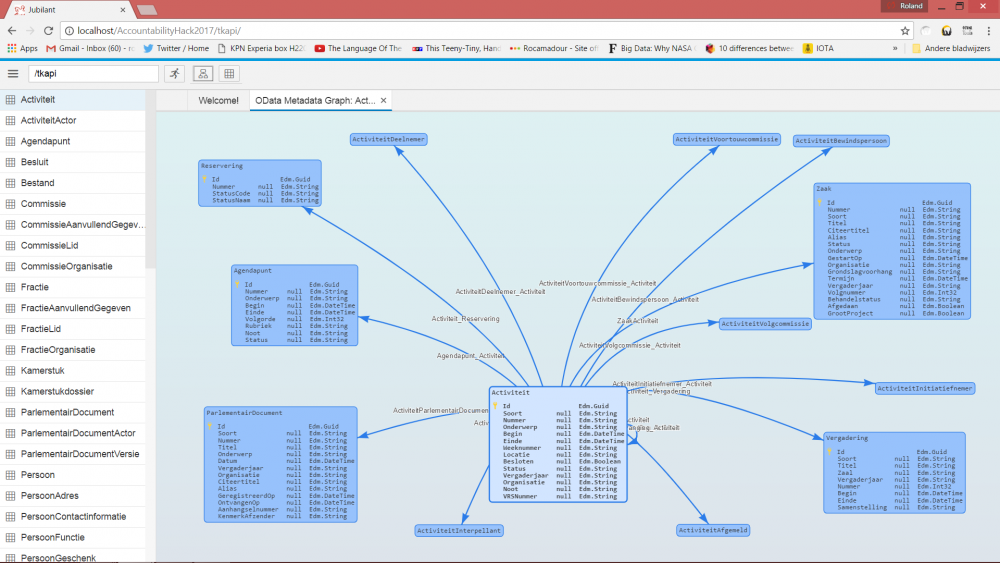
The Jubilant concept allows a plugin developer to focus on making a cool visualisation, without having having to invest time and effort to provide the user with a query builder. During the hackathon I managed to create two plugins - one simple table visualisation, which simply renders raw data in a data grid, and a OData Metadata Graph visualiser, which plots the structure, entity types and relationships exposed by the OData service as a graph.

OData and Open Data

The connection to open data and the assignment for the Accountability Hack is that a number of key open data API's use the OData protocol. A good example is the Dutch Parliament API.

Interestingly, there are relatively few OData query tools available, and none of them are particularly affordable. In fact, during the accountability hackathon a few teams tried to work with these OData APIs and discovered they didn't quite know how to access and process them. I don't know if this finding influenced the jury in any way, but it certainly highlighted the need for a tool like Jubilant.

For Just-BI OData is a key protocol as well, since it happens to be the standard way of exposing data by many SAP products, like SAP/HANA. While Just-BI is a general end-to-end Business Intelligence shop, many of our customer engagements have a strong focus on SAP products. This is also reflected in the Open UI5 framework, which has rather good support for OData.

Result: 2nd Prize!

I was surprised, but obviously very happy to have been awarded the 2nd prize, which is good for 1.500 EUR. It is a honour and a privilege to be in a position to work on stuff I like and maybe contribute something to the transparency of the Dutch democracy. And, frankly, I just had a great time hacking!

Since this was basically just a working day for me, I decided to donate 500 EUR of the prize money to Just-Care, which is a charity supported by Just-BI.

Where to get Jubilant?

At Just-BI, we're currently working out the exact details around a release of Jubilant. I will write an update as soon as I can disclose more, but I can already say that all the work I did for the accountability hack will become available as Open Source Software in the very near future.

In the mean while, if you're interested in Jubilant and OData-based self-service BI, don't hesitate to contact me. Or contact Just-BI.

Monday, October 24, 2016

SAP HANA: On which base columns do my information views depend?

For one of Just-BI's customers, we're currently working to productize a custom-built proof-of-concept SAP/HANA application.

This particular application is quite typical with regard to how we use SAP/HANA features and techniques: it is a web-application for desktop and tablet devices, that we serve through SAP/HANA's XS engine. For database communication, we mostly use OData (using XS OData Services), as well as the odd xsjs request (in this case, to offer MS Excel export using ODXL)

The OData services that our application uses are mostly backed by SAP/HANA Calculation views. These, in turn, are built on top of a mixed bag of objects:

  • Some of these are custom base tables that belong to just our application;
  • Some are base tables that collect output from an advanced analytics recommendations algorithm that runs in an external R server
  • Some are information views (analytic views, attribute views and calculations views) that form a virtual datamart (of sorts) on top of base tables replicated from various SAP ERP source systems to our SAP/HANA database.

One of the prerequisites to productize the current solution is a re-design of the backend. Redesign is required because the new target system will be fed from even more ERP source systems than our proof-of-concept environment, and the new backend will need to align the data from all these different ERP implementations. In addition, the R algorithm will be optimized as well: in the proof-of-concept environment, the advanced analytics algorithm passes through a number of fields for convenience that will need to be acquired from elsewhere in the production environment.

To facilitate the redesign we need to have accurate insight into which base columns are ultimately used to implement our application's data services. As it turns out, this is not so easily obtainable using standard tools. So, we developed something ourselves. We think this may be useful for others as well, which is why we'd like to share it with you through this blog.

Information View Dependencies

The standard toolset offers some support to obtain dependencies for information views (analytic views, attribute views and calculation views):

As it turns out, these standard tools do not give us the detailed information that we need. The HANA studio features are mainly useful when designing and modifying information views, but do not let us obtain an overview of all dependencies, and not in a way that we can easily use outside of HANA Studio. The usefulness of querying the OBJECT_DEPENDENCIES system view is limited by the fact that it only reports objects - that is, base tables or information views - but not the columns contained therein.

It looks like we're not the only ones struggling with this issue.

Getting the information view's definition as XML from _SYS_REPO.ACTIVE_OBJECT

To get the kind of information we need, we're just going to have to crack open the definition of the information view and look what's inside. As it turns out, HANA stores this as XML in the CDATA column of the _SYS_REPO.ACTIVE_OBJECT system table, and we can query it by package name, object name and object suffix (which is basically the extension of the file containing the definition that is stored in the repository):

SELECT  CDATA
FROM    _SYS_REPO.ACTIVE_OBJECT
WHERE   PACKAGE_ID    = 'my.package.name'
AND     OBJECT_NAME   = 'CA_MY_CALCULATION_VIEW'
AND     OBJECT_SUFFIX = 'calculationview'

With some effort, _SYS_REPO.ACTIVE_OBJECT can be joined to OBJECT_DEPENDENCIES to discover the objects on which the information view depends:

SELECT      od.BASE_SCHEMA_NAME
,           od.BASE_OBJECT_NAME
,           od.BASE_OBJECT_TYPE
FROM        _SYS_REPO.ACTIVE_OBJECT ao
INNER JOIN  OBJECT_DEPENDENCIES     od
ON          '_SYS_BIC'                          = od.DEPENDENT_SCHEMA_NAME
AND         ao.PACKAGE_ID||'/'||ao.OBJECT_NAME  = od.DEPENDENT_OBJECT_NAME
AND         'VIEW'                              = od.DEPENDENT_OBJECT_TYPE
WHERE       ao.PACKAGE_ID                       = 'my.package.name'
AND         ao.OBJECT_NAME                      = 'CA_MY_CALCULATION_VIEW'
AND         ao.OBJECT_SUFFIX                    = 'calculationview'

(Note: OBJECT_DEPENDENCIES reports all dependencies, not just direct dependencies)

Or we can query the other way around, and find the corresponding model for a dependency we found in OBJECT_DEPENDENCIES:

SELECT      ao.PACKAGE_ID
,           ao.OBJECT_NAME
,           ao.OBJECT_SUFFIX
,           ao.CDATA
FROM        object_dependencies     od
INNER JOIN  _SYS_REPO.ACTIVE_OBJECT ao
ON          SUBSTR_BEFORE(od.base_object_name, '/') = ao.package_id
AND         SUBSTR_AFTER(od.base_object_name, '/')  = ao.object_name
AND         ao.object_suffix in (
              'analyticview'
            , 'attributeview'
            , 'calculationview'
            )
WHERE       od.DEPENDENT_SCHEMA_NAME = '_SYS_BIC'
AND         od.DEPENDENT_OBJECT_NAME = 'my.package.name/CA_MY_CALCULATION_VIEW'
AND         od.DEPENDENT_OBJECT_TYPE = 'VIEW'

NOTE: It turns out that querying OBJECT_DEPENDENCIES fails at reporting dependencies between analytic views and the attribute views they use. To capture those dependencies, you need to query _SYS_REPO.ACTIVE_OBJECTCROSSREF.

Parsing the information view's XML definition with stored procedure p_parse_xml

Once we obtained the XML that defines the information view, we still need to pull it apart so we can figure out how it is tied to our base table columns. To do that, we first apply a general XML parser that turns the XML text into a (temporary) table or table variable, such that each row represents a distinct, atomic element inside the XML document. For this purpose I developed a HANA stored procedure called p_parse_xml. Here is its signature:

create PROCEDURE p_parse_xml (
  -- XML string to parse
  p_xml nclob
  -- Parse tree is returned as a table variable
, out p_dom table (
    -- unique id of the node
    node_id           int
    -- id of the parent node
  , parent_node_id    int
    -- dom node type constant: 1=element, 2=attribute, 3=text, 4=cdata,
    --                         5=entityref, 6=entity, 7=processing instruction, 
    --                         8=comment, 9=document, 10=document type, 
    --                         11=document fragment, 12=notation
  , node_type         tinyint
    -- dom node name: tagname for element, attribute name for attribute, 
    --                target for processing instruction,
    --                document type name for document type,
    --                "#text" for text and cdata, "#comment" for comment, 
    --                "#document" for document, "#document-fragment" for document fragment.
  , node_name         nvarchar(64)  
    -- dom node value: text for text, comment, and cdata nodes, data for processing instruction node, null otherwise.
  , node_value        nclob
    -- raw token from the parser
  , token_text        nclob         
    -- character position of token
  , pos               int           
    -- lenght of token.
  , len               int           
  )
  -- flag whether to strip text nodes that only contain whitespace from the parse tree
, p_strip_empty_text  tinyint default 1
) 

Note that you can download the source dode for the entire procedure from github. The p_parse_xml procedure depends on p_decode_xml_entities, so if you want to run it yourself, be sure to install that first.

To see how you can use this, consider the following, simple example:

call p_parse_xml(
'<parent-element attribute1="value1">
  <child-element attribute2="value2" attribute3="value3">
    text-content1
  </child-element>
  <child-element att="bla">
    text-content2
  </child-element>
</parent-element>', ?);

This gives us the following result:

+---------+----------------+-----------+----------------+-----------------------------+-------------------------------------------------------------+-----+-----+
| NODE_ID | PARENT_NODE_ID | NODE_TYPE | NODE_NAME      | NODE_VALUE                  | TOKEN_TEXT                                                  | POS | LEN |
+---------+----------------+-----------+----------------+-----------------------------+-------------------------------------------------------------+-----+-----+
| 0       | ?              | 9         | #document      | ?                           | ?                                                           | 1   | 221 |
| 1       | 0              | 1         | parent-element | ?                           | <parent-element attribute1=\"value1\">                      | 1   | 36  |
| 2       | 1              | 2         | attribute1     | value1                      |  attribute1=\"value1\"                                      | 2   | 20  |
| 3       | 1              | 1         | child-element  | ?                           | <child-element attribute2=\"value2\" attribute3=\"value3\"> | 41  | 55  |
| 4       | 3              | 2         | attribute2     | value2                      |  attribute2=\"value2\"                                      | 42  | 20  |
| 5       | 3              | 2         | attribute3     | value3                      |  attribute3=\"value3\"                                      | 62  | 20  |
| 6       | 3              | 3         | #text          | text-content1               | text-content1                                               | 96  | 23  | 
| 7       | 1              | 1         | child-element  | ?                           | <child-element att=\"bla\">                                 | 139 | 25  |
| 8       | 7              | 2         | att            | bla                         |  att=\"bla\"                                                | 140 | 10  |
| 9       | 7              | 3         | #text          | text-content2               | text-content2                                               | 164 | 23  |
+---------+----------------+-----------+----------------+-----------------------------+-------------------------------------------------------------+-----+-----+

The result is a tabular representation of the XML parse tree. Each row essentially represents a DOM Node, and the column values represent the node's properties:

  • The NODE_TYPE column tells us what kind of node we're dealing with. Values in this column conform to the w3c standard document object model (DOM) enumeration of node type values. The most important ones are 1 for element nodes ("tags"); 2 for attributes, and 3 for text. The entire parse tree is contained in a document node, which has node type 9.
  • The NODE_ID is the unique identifier of the node while PARENT_NODE_ID points to whatever node is considered the parent node of the current node. The parent node is basically the container of the node. As you can see, the element with NODE_ID=3 has the element node with NODE_ID=1 as parent. These correspond to the first <child-element> and <parent-element> elements in the document. Attribute nodes are also marked as children of the element to which they belong. The DOM standard does not consider attributes children of their respective element node, but p_parse_xml does, mainly to keep the result table as simple as possible.
  • The NODE_NAME column is a further characterization of what kind of node we're realing with. For most node types, the node name is a constant value which is essentially a friendly name for the node type.For example, document nodes (NODE_TYPE=9 always have #document as NODE_NAME, and text nodes (NODE_TYPE=3) always have #text as NODE_NAME. For element nodes and attribute nodes (NODE_TYPE is 1 and 2 respectively), the NODE_NAME is not constant. Rather, their node name conveys information about the meaning of the node and its contents. In other words, element and attribute names are metadata.
  • The NODE_VALUE column contains actual data. For element and document nodes, it is alway NULL. For attributes, the NODE_VALUE column contains the attribute value, and for text nodes, it is the text content.
  • The POS lists the position where the current element was found; the LEN column keeps track of the length of current item as it appears in the doucment. Typically you won't need these columns, except maybe for debugging purposes. The TOKEN_TEXT column is also here mostly for debugging purposes.

Extracting Base Columns from Analytic and Attribute views

If you examine the XML definition of Analytic and/or Attribute views, you'll notice that table base columns are referenced by <keyMapping> and <measureMapping>-elements like this:

<keyMapping schemaName="...database schema..." columnObjectName="...table name..." columnName="...column name..."/>

So, assuming we already parsed the model of an analytic or attribute view using p_parse_xml and captured its result in a table variable called tab_dom, we can run a query like this to obtain all <keyMapping> and <measureMapping>-elements:

select     mapping.*
from       :tab_dom mapping
where      mapping.node_type = 1            -- get us all elements
and        mapping.node_name in ('keyMapping' -- with tagnames 'keyMappping' or 'measureMappping'
                                   ,'measureMapping') 

While this gives us the actual elements, the actual data we're interested in is buried in the attributes of the <keyMapping> and <measureMapping>-elements. You might recall that in the p_parse_xml result, attribute nodes have NODE_TYPE=2 appear as childnode of their respective element. So, we can extract all attributes of all <keyMapping> and <measureMapping>-elements with a self-join like this:

select      mapping_attributes.*
from        :tab_dom            mapping
inner join  :tab_dom            mapping_attributes
on          mapping.node_id   = mapping_attributes.parent_node_id -- find all nodes that have the keymapping element node as parent 
and         2                 = mapping_attributes.node_type      -- but only if their node type indicates they are attribute nodes
where       mapping.node_type = 1                                    
and         mapping.node_name in ('keyMapping', 'measureMapping')                         

Since we are interested in not just any attribute node, but attribute nodes having specific names like schemaName, columnObjectName and columnName, we should put a further restriction on the NODE_NAME of these attribute nodes. Also note that this query will potentially give us multiple rows per <keyMapping> or <measureMapping>-element (in fact, just as many as there are attributes). Since we'd like to have just one row for each <keyMapping> or <measureMapping>-element having the values of its schemaName, columnObjectName and columnName attributes in separate columns, we should rewrite this query so that each attribute gets its own self-join.

Thus, the final query becomes:

select     mapping_schemaName.node_value       as schema_name
,          mapping_columnObjectName.node_value as table_name
,          mapping_columnName.node_value       as column_name
from       :tab_dom               mapping
inner join :tab_dom               mapping_schemaName                      -- get the attribute called 'schemaName'
on         mapping.node_id      = mapping_schemaName.parent_node_id
and        2                    = mapping_schemaName.node_type 
and        'schemaName'         = mapping_schemaName.node_name 
inner join :tab_dom               mapping_columnObjectName                -- get the attribute called 'columnObjectName'
on         mapping.node_id      = mapping_columnObjectName.parent_node_id 
and        2                    = mapping_columnObjectName.node_type 
and        'columnObjectName'   = mapping_columnObjectName.node_name 
inner join :tab_dom               mapping_columnName                      -- get the attribute called 'columnName'
on         mapping.node_id      = mapping_columnName.parent_node_id       
and        2                    = mapping_columnName.node_type 
and        'columnName'         = mapping_columnName.node_name 
where      mapping.node_type = 1
and        mapping.node_name in ('keyMapping', 'measureMapping')                         

Extracting base columns from Calculation views

Getting the base columns used in calculation views is a bit more work. However, the good news is that in terms of the queries we need to write, it does not get much more complicated than what we witnessed for analytic and attribute views in te previous section. Querying the xml parse tree almost always boils down to finding elements and finding their attributes, and then doing something with their values.

The reason why it is more work to write queries against the model underlying calculation views is that the XML documents that define calculationviews use an extra level of mapping between the objects that represent the source of the columns and the way these columns are used inside the view. The following snippet might illustrate this:

<Calculation:scenario ...>
  ...
  <dataSources>
    ...
    <DataSource id="...some id used to refer to this datasource..." type="DATA_BASE_TABLE">
      ...
      <columnObject schemaName="...db schema name..." columnObjectName="...table name..."/>
      ...
    </DataSource>
    ...
  </dataSources>
  ...
  <calculationViews>
    ...
    <calculationView>
      ...
      <input node="#...id of a DataSource element...">
        ...
        <mapping source="...name of a column used as input..." ... >
        ...
      </input>
      ...
    </calculationView>
    ...
  </calculationViews>
  ...
</Calculation:scenario>

The method for finding the base columns can be summarized as follows:

  1. Get all <DataSource>-elements having a type-attribute with the value "DATA_BASE_TABLE". These elements represent all base tables used by this view. Other types of objects used by this view will have another value for the type-attribute.

    To obtain the schema and table name of the base table, find the <columnObject>-childelement of the <DataSource>-element. Its schemaName and columnObjectName-attributes respectively contain the database schema and table name of the base table.

    The <DataSource>-elements have an id attribute, and its value is used as unique identifier to refer to this data source.

  2. Find all instances where the base table datasources are used.

    A calculation view is essentially a graph of data transformation steps, each of which takes one or more streams of data as input, turning it into a stream of output data. In the XML document that defines the calculation view, these transformation steps are represented by <calulationView>-elements. These <calulationView>-elements contain one or more <input>-child elements, each of which represents a data stream that is used as input for the transformation step.

    The <input>-elements have a node-attribute. The value of the node-attribute is the value of the id-attribute of whatever element it refers to, prefixed by a hash-sign (#).

    Note that this is a general technique to reference elements within the same XML document. So, in order to find where a <DataSource>-element is used, it is enough to find all elements in the same XML document that reference the value <DataSource>-element's id-attribute in the value of their node-attribute.

  3. Once we have the elements that refer to our <DataSource>-element, we can find out which columns from the data source are used by looking for <mapping>-child elements.

    The <mapping>-elements have a source-attribute, which holds the column-name.

With these steps in mind, the SQL query we need to do on the calculation view parse tree becomes:

select     distinct
           ds_co_schemaName.node_value         schema_name
,          ds_co_columnObjectName.node_value   table_name
,          ds_usage_mapping_source.node_value  column_name
--
-- ds: DataSource elements (Note the WHERE clause)
-- 
from       :tab_dom                            ds
--
-- ds_type: demand that the value of the type-attribute of the DataSource elements equal 'DATA_BASE_TABLE'
--          this ensures we're only looking at base tables.
-- 
inner join :tab_dom                            ds_type
on         ds.node_id                        = ds_type.parent_node_id
and        2                                 = ds_type.node_type
and        'type'                            = ds_type.node_name
and        'DATA_BASE_TABLE'                 = cast(ds_type.node_value as varchar(128))
--
-- ds_co: get the columnObject childelement of the DataSource element.
--        Also, get the schemaName and columnObjectName attributes of that columnObject-element. 
--
inner join :tab_dom                            ds_co
on         ds.node_id                        = ds_co.parent_node_id
and        1                                 = ds_co.node_type
and        'columnObject'                    = ds_co.node_name
inner join :tab_dom                            ds_co_schemaName
on         ds_co.node_id                     = ds_co_schemaName.parent_node_id
and        2                                 = ds_co_schemaName.node_type
and        'schemaName'                      = ds_co_schemaName.node_name
inner join :tab_dom                            ds_co_columnObjectName
on         ds_co.node_id                     = ds_co_columnObjectName.parent_node_id
and        2                                 = ds_co_columnObjectName.node_type
and        'columnObjectName'                = ds_co_columnObjectName.node_name
--
-- ds_id: get the id-attribute of the DataSource element.
--
inner join :tab_dom                            ds_id
on         ds.node_id                        = ds_id.parent_node_id
and        2                                 = ds_id.node_type
and        'id'                              = ds_id.node_name
--
-- ds_usage: find any attributes that refer to the id of the DataSource 
--
inner join :tab_dom                            ds_usage
on         'node'                            = ds_usage.node_name
and        2                                 = ds_usage.node_type
and        '#'||ds_id.node_value             = cast(ds_usage.node_value as nvarchar(128))
--
-- ds_mapping: find any mapping child elements of the node that references the DataSource 
--
inner join :tab_dom                            ds_usage_mapping
on         'mapping'                         = ds_usage_mapping.node_name
and        1                                 = ds_usage_mapping.node_type
and        ds_usage.node_id                  = ds_usage_mapping.parent_node_id
--
-- ds_mapping_source: get the source of the mapping elements. These are our base column names.
--
inner join :tab_dom                            ds_usage_mapping_source
on         'source'                          = ds_usage_mapping_source.node_name
and        2                                 = ds_usage_mapping_source.node_type
and        ds_usage_mapping.node_id          = ds_usage_mapping_source.parent_node_id
where      ds.node_type                      = 1
and        ds.node_name                      = 'DataSource'

Putting it all together

To recapitulate, we discussed
  1. How to do general queries for dependencies using OBJECT_DEPENDENCIES, but that you need to query _SYS_REPO.ACTIVE_OBJECTCROSSREF to find out which Attribute views are used by Analytic views.
  2. How to find the model XML code underlying our information views from the _SYS_REPO.ACTIVE_OBJECT table.
  3. How to parse XML, and how to query the parse tree for elements and attributes
  4. How the XML documents for information views are structured, and how to find base columns used in their models

With all these bits and pieces of information, we can finally create a procedure that fullfills the original requirement to obtain the base columns used by our information views. This is available as the p_get_view_basecols stored procedure. Here is its signature:

create PROCEDURE p_get_view_basecols (
  -- package name pattern. Used to match packages containing analytic, attribute or calculation views. Can contain LIKE wildcards.
  p_package_id    nvarchar(255)
  -- object name pattern. Used to match name of analytic, attribute or calculation views. Can contain LIKE wildcards.
, p_object_name   nvarchar(255) default '%'
  -- object suffix pattern. Can be used to specify the type of view. Can contain LIKE wildcards.
, p_object_suffix nvarchar(255) default '%'
  -- flag to indicate whether to recursively analyze analytic, attribute or calculation views on which the view to be analyzed depends. 
  -- 0 means only look at the given view, 1 means also look at underlying views.
, p_recursive     tinyint default 1
  -- result table: base columns on which the specified view(s) depends.
, out p_cols table (
    -- schema name of the referenced base column
    schema_name nvarchar(128)
    -- table name of the referenced base column
  , table_name  nvarchar(128)
    -- column name of the referenced base column
  , column_name nvarchar(128)
    -- list of view names that depend on the base column
  , views       nclob
  )
)

Obtaining the list of base columns on which our application depends is now as simple as calling the procedure, like so:

call p_get_view_basecols(
  -- look in our application package (and its subpackages)
  'our.application.package.%' 
  -- consider all information views
, '%'
  -- consider all types of information views
, '%'
  -- consider also information views upon which our information views depend
, 1
  -- put the results into our output table
, ?
);

Finally

I hope you enjoyed this post! Feel free to leave a comment to share your insights or to give feedback.

Please note that all source code for this topic is freely available as open source software in our just-bi/hades github reposiory. You are free to use, modify and distribute it, as long as you respect the copyright notice.

We welcome contributions! You can contribute in many ways:

  • Simply use the procedures. Give us feedback. You can do so by leaving a comment on this blog.
  • Spread the word: tell your colleagues, and maybe tweet or write blog post about it. Please use hashtag #justbihades
  • Share your requirements. Create an issue to ask for more features so we can improve our software.
  • Fork it!. Send us pull requests. We welcome your contribution and we will fully attribute you!

Wednesday, May 04, 2016

ODXL - A generic Data Export Layer for SAP/HANA based on OData

I'm very pleased to be able to announce the immediate availability of the Open Data Export Layer (ODXL) for SAP/HANA!

Executive summary

ODXL is a framework that provides generic data export capabilities for the SAP/HANA platform. ODXL is implemented as a xsjs Web service that understands OData web requests, and delivers a response by means of a pluggable data output handler. Developers can use ODXL as a back-end component, or even as a global instance-wide service to provide clean, performant and extensible data export capabilities for their SAP/HANA applications.

Currently, ODXL provides output handlers for comma-separated values (csv) as well as Microsoft Excel output. However, ODXL is designed so that developers can write their own response handlers and extend ODXL to export data to other output formats according to their requirements.

ODXL is provided by Just BI to the SAP/HANA developer community as open source software under the terms of the Apache 2.0 License. This means you are free to use, modify and distribute ODXL. For the exact terms and conditions, please refer to the license text.

The source code is available on github. Developers are encouraged to check out the source code and to contribute to the project. You can contribute in many ways: we value any feedback, suggestions for new features, filing bug reports, or code enhancements.

If you require professional support for ODXL, please contact Just-BI for details.

What exactly is ODXL?

ODXL started as an in-house project at the Just-BI department of custom development. It was borne from the observation that the SAP/HANA web applications that we develop for our customers often require some form of data export, typically to Microsoft Excel. Rather than creating this type of functionality again for each project, we decided to invest some time and effort to design and develop this solution in such a way that it can easily be deployed as a reusable component. And preferably, in a way that feels natural to SAP/HANA xs platform application developers.

What we came up with, is a xsjs web service that understands requests that look and feel like standard OData GET requests, but which returns the data in some custom output format. ODXL was designed to make it easily extensible so that developers can build their own modules that create and deliver the data in whatever output format suits their requirements.

This is illustrated in the high-level overview below:


For customers of Just-BI, there is an immediate requirement to get Microsoft Excel output. So, we went ahead and implemented output handlers for .xlsx and .csv formats, and we included those in the project. This means that ODXL supports data export to the .xlsx and .csv formats right out of the box.

However, support for any particular output format is entirely optional and can be controlled by configuration and/or extension:
  • Developers can develop their own output handlers to supply data export to whatever output format they like.
  • SAP/HANA Admins and/or application developers can choose to install only those output handlers they require, and configure how Content-Type headers and OData $format values map to output handlers.

So ODXL is OData? Doesn't SAP/HANA suppport OData already?

The SAP/HANA platform provides data access via the OData standard. This facility is very convenient for object-level read- and write access to database data for typical modern web applications. In this scenario, the web application would typically use asynchronous XML Http requests, and data would be exchanged in either Atom (a XML dialect) or JSON format.

ODXL's primary goal is to provide web applications with a way to export datasets in the form of documents. Data export tasks typically deal with data sets that are quite a bit larger than the ones accessed from within a web application. In addition, an data export document might very well compromise multiple parts - in other words, it may contain multiple datasets. The typical example is exporting multiple lists of different items from a web application to a workbook containaing multiple spreadsheets with data. In fact, the concrete use case from whence ODXL originated was the requirement to export multiple datasets to Microsoft Excel .xlsx workbooks.

So, ODXL is not OData. Rather, ODXL is complementary to SAP/HANA OData services. That said, the design of ODXL does borrow elements from standard OData.

OData Features, Extensions and omissions

ODXL GET requests follow the syntax and features of OData standard GET requests. Here's a simple example to illustrate the ODXL GET request:
GET "RBOUMAN"/"PRODUCTS"?$select=PRODUCTCODE, PRODUCTNAME& $filter=PRODUCTVENDOR eq 'Classic Metal Creations' and QUANTITYINSTOCK gt 1&$orderby=BUYPRICE desc&$skip=0&$top=5
This request is build up like so:
  • "RBOUMAN"/"PRODUCTS": get data from the "PRODUCTS" table in the database schema called "RBOUMAN".
  • $select=PRODUCTCODE, PRODUCTNAME: Only get values for the columns PRODUCTCODE and PRODUCTNAME.
  • $filter=PRODUCTVENDOR eq 'Classic Metal Creations' and QUANTITYINSTOCK ge 1: Only get in-stock products from the vendor 'Classic Metal Creations'.
  • $orderby=BUYPRICE desc: Order the data from highest price to lowest.
  • $skip=0&$top=5: Only get the first five results.
For more detailed information about invoking the odxl service, check out the section about the sample application. The sample application offers a very easy way to use ODXL for any table, view, or calculation view you can access and allows you to familiarize yourself in detail with the URL format.

In addition, ODXL supports the OData $batch POST request to support export of multiple datasets into a single response document.

The reasons to follow OData in these respects are quite simple:
  • OData is simple and powerful. It is easy to use, and it gets the job done. There is no need to reinvent the wheel here.
  • ODXL's target audience, that is to say, SAP/HANA application developers, are already familiar with OData. They can integrate and use ODXL into their applications with minimal effort, and maybe even reuse the code they use to build their OData queries to target ODXL.
ODXL does not follow the OData standard with respect to the format of the response. This is a feature: OData only specifies Atom (an XML dialect) and JSON output, whereas ODXL can supply any output format. ODXL can support any output format because it allows developers to plug-in their own modules called output handlers that create and deliver the output.

Currently ODXL provides two output handlers: one for comma-separated values (.csv), and one for Microsoft Excel (.xlsx). If that is all you need, you're set. And if you need some special output format, you can use the code of these output handlers to see how it is done and then write your own output handler.

ODXL does respect the OData standard with regard to how the client can specify what type of response they would like to receive. Clients can specify the MIME-type of the desired output format in a standard HTTP Accept: request header:
  • Accept: text/csv specifies that the response should be returned in comma separated values format.
  • Accept: application/vnd.openxmlformats-officedocument.spreadsheetml.sheet specifies that the response should be returned in open office xml workbook format (Excel .xlsx format).
Alternatively, they can specify a $format=<format> query option, where <format> identifies the output format:
  • $format=csv for csv format
  • $format=xlsx for .xlsx format
Note that a format specified by the $format query option will override any format specified in an Accept:-header, as per OData specification.

ODXL admins can configure which MIME-types will be supported by a particular ODXL service instance, and how these map to pluggable output handlers. In addition, they can configure how values for passed for the $format query option map to MIME-types. ODXL comes with a standard configuration with mappings for the predefined output handlers for .csv and .xlsx output.

On the request side of things, most of OData's features are implemented by ODXL:
  • The $select query option to specify which fields are to be returned
  • The $filter query option allows complex conditions restricting the returned data. OData standard functions are implemented too.
  • The $skip and $top query options to export only a portion of the data
  • The $orderby query option to specify how the data should be sorted
ODXL currently does not offer support for the following OData features: The features that are currently not supported may be implemented in the future. For now, we feel the effort the implement them and adequately map their semantics to ODXL may not be worth the trouble. However, an implementation can surely be provided should there be sufficient interest from the community.

Installation

Use ODXL presumes you already have a SAP/HANA installation with a properly working xs engine. You also need HANA Studio, or Eclipse with the SAP HANA Tools plugin installed. The steps are a little bit different, depending on whether you just want to use ODXL, or whether you want to actively develop the ODXL project.

Here are the steps if you just want to use ODXL, and have no need to actively develop the project:
  1. In HANA Studio/Eclipse, create a new HANA xs project. Alternatively, find an existing HANA xs project.
  2. Find the ODXL repository on github, and download the project as a zipped folder. (Select a particular branch if you desire so; typically you'll want to get the master branch)
  3. Extract the project from the zip. This will yield a folder. Copy its contents, and place them into your xs project directory (or one of its sub directories)
  4. Activate the new content.
After taking these steps, you should now have a working ODXL service, as well as a sample application. The service itself is in the service subdirectory, and you'll find the sample application inside the app subdirectory.

The service and the application are both self-contained xs applications, and should be completely independent in terms of resources. The service does not require the application to be present, but obviously, the application does rely on being able to call upon the service.

If you only need the service, for example, because you want to call it directly from your own sample application, then you don't need the sample application. You can safely copy only the contents of the service directory and put those right inside your project directory (or one of its subdirectories) in that case. But even then, you might still want to hang on to the sample application, because you can use that to generate the web service calls that you might want to do from within your application.

If you want to hack on ODXL then you might want to fork or clone the ODXL github repository. If you do this inside a SAP/HANA xs project, or if you create a project pointing to that location, you can then deploy that to SAP/HANA and use that to send pull requests in case you want to contribute your changes back into the project.

Getting started with the sample application

To get up and running quickly, we included a sample web application in the ODXL project. The purpose of this sample application is to provide an easy way to evaluate and test ODXL.

The sample application lets you browse the available database schemas and queryable objects: tables and views, including calculation views (or at least, their SQL queryable runtime representation). After making the selection, it will build up a form showing the available columns. You can then use the form to select or deselect columns, apply filter conditions, and/or specify any sorting order. If the selected object is a calculation view that defines input parameters, then a form will be shown where you can enter values for those too.

In the mean while, as you're entering options into the form, a textarea will show the URL that should be used to invoke the ODXL service. If you like, you can manually tweak this URL as well. Finally, you can use one of the download links to immediately download the result corresponding to the current URL in either .csv or .xlsx format.

Alternatively, you can hit a button to add the URL to a batch request. When you're done adding items to the batch, you can hit the download workbook button to download as single .xlsx workbook, containing one worksheet for each dataset in the batch.

What versions of SAP/HANA are supported?

We initially built and tested ODXL on SPS9. The initial implementation used the $.hdb database interface, as well as the $.util.Zip builtin.

We then built abstraction layers for both database access and zip support to allow automtic fallback to the $.db database interface, and to use a pure javascript implementation of the zip algorithm based on Stuart Knightley's JSZip library. We tested this on SPS8, and everyting seems to work fine there.

We have not actively tested earlier SAP/HANA versions, but as far as we know, ODXL should work on any earlier version. If you find that it doesn't, then please let us know - we will gladly look into the issue and see if we can provide a solution.

Why Open Source? What's the Business Model? What's the catch?

For Just BI, Open Source software is not a business model, but a development model. While some companies build a successful business model around selling custom code code, this is currently not Just-BI's primary goal. Rather, Just-BI is a consulting company that focuses mainly on Business Intelligence solutions around the SAP ecosystem. Our areas of expertise include Business Objects, SAP BW, SAP HANA, as well as custom BI (web) Helping customers by providing solutions for their business problems is Just-BI's primary concern - not selling code.

However, we do acknowledge that sometimes, custom code plays an essential role in building a business solution for our customers. In these cases, we will gladly help our customers to design, build and deploy such solutions. But even in these cases we will try to look for standard component toolkits, like SAP UI5, or frameworks like Angular as a basis for our work.

The urge to standardize on familiar, well known toolkits and libraries hardly needs justification. In the end, customers don't have the end goal of acquiring and owning too many custom coded solutions, because today's hot new custom solution is tomorrow's legacy. The more a customer relies on custom code, the harder it will become to maintain and to move forward.

Sometimes, a particular building block that we need for applications may not be publicly available already. If such a building block is sufficiently generic (i.e., not bound to any particular customer) then we have every reason to want that to become a standard. For a generic and reusable component like ODXL, we believe that an open source model is the right way to do that.

We think that an open source development model will help maintain and advance ODXL. By using an open source release and development model, we have potentially more eyes to scrutinize our code, find bugs, suggest features, etc. In addition we hope our customers will feel more confident to embrace an open source solution, since they need not be locked into only our company for support and ongoing development.

How to Contribute

If you want to, there are many different ways to contribute to ODXL.
  1. If you want to suggest a new feature, or report a defect, then please use the github issue tracker.
  2. If you want to contribute code for a bugfix, or for a new feature, then please send a pull request. If you are considering to contribute code then we do urge you to first create an issue to open up discussion with fellow ODXL developers on how to best scratch your itch
  3. If you are using ODXL and if you like it, then consider to spread the word - tell your co-workers about it, write a blog, or a tweet, or a facebook post.
Thank you in advance for your contributions!

Finally

I hope you enjoyed this post! I hope ODXL will be useful to you. If so, I look forward to getting your feedback on how it works for you and how we might improve it. Thanks for your Time!

DuckDb Performance: min, max, and median vs quantile

I was playing with some classical statistics in DuckDB and I ran into something I'd like to share. It's about the measures minimum,...